Summary
This OpenPath plugin is designed to work with the heartland’s SecureSubmit WordPress plugin. Every time a checkout happens on a WooCommerce website, the transaction will be then sent to OpenPath API and will be tested against validations through the OpenPath engine.
Prerequisites
- A WordPress powered website with WooCommerce installed.
- Heartland’s SecureSubmit WordPress plugin (version 1.13.0 or higher)
Installation
In order to install the OpenPath plugin, WooCommerce and SecureSubmit plugins must be set up first. Please refer to https://woocommerce.com/ for WooCommerce installation and https://wordpress.org/plugins/woocommerce-securesubmit-gateway/ for heartland installation.
After installing the required plugins, install the OpenPath plugin manually by pasting the folder to \wp-content\plugins directory of the website.
Configuration
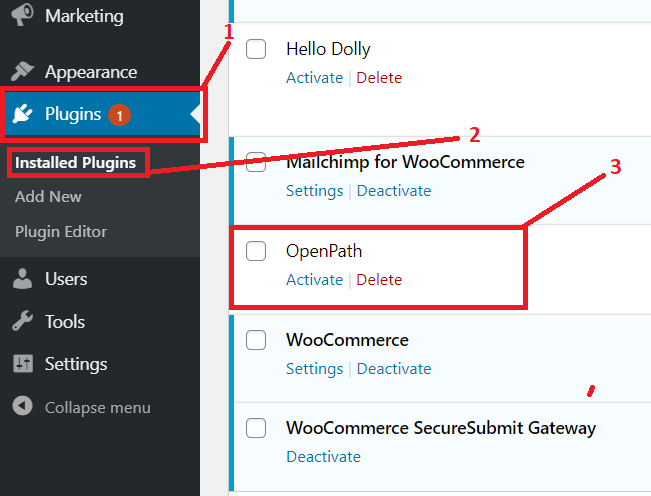
Login to your WordPress admin dashboard then navigate to:
Plugins
Installed plugins
OpenPath
And click activate.
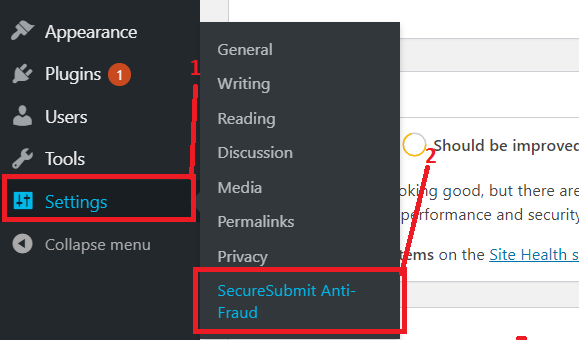
Navigate to settings > SecureSubmit Anti-Fraud
Input your OpenPath site API Key on the API KEY text box and click on save changes.
You’re good to go to test the site.
Was this article helpful?
That’s Great!
Thank you for your feedback
Sorry! We couldn't be helpful
Thank you for your feedback
Feedback sent
We appreciate your effort and will try to fix the article